
GitHub Integration
Workset integrates with GitHub for pull request creation, status checks, and review comments — both from the CLI and the desktop app.
Authentication
Section titled “Authentication”GitHub CLI (Recommended)
Section titled “GitHub CLI (Recommended)”Workset uses your GitHub CLI session by default:
gh auth loginThis works for both the CLI and the desktop app. No additional configuration needed.
Personal Access Token
Section titled “Personal Access Token”If you prefer a personal access token:
Desktop App: Go to Settings → GitHub, switch to PAT mode, and save a token with repo access. Workset stores it in your OS keychain.
CLI: Set WORKSET_GITHUB_PAT in your environment:
WORKSET_GITHUB_PAT=ghp_... workset <command>Custom gh Path
Section titled “Custom gh Path”If gh is not on your PATH (e.g., Nix), set the override in ~/.workset/config.yaml:
github: cli_path: /Users/you/.nix-profile/bin/ghCreating Pull Requests
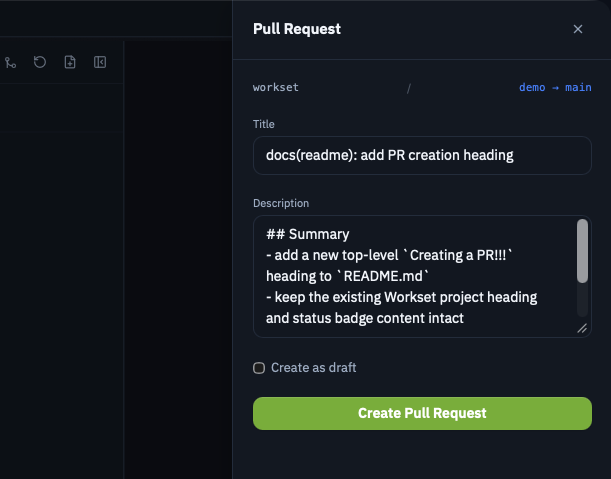
Section titled “Creating Pull Requests”From the desktop app, you can create PRs directly from the GitHub workflows panel. The app handles:
- Branch selection
- Base branch targeting
- PR title and description
- Reviewer assignment
AI-Generated PR Descriptions
Section titled “AI-Generated PR Descriptions”Workset can generate PR descriptions using AI agents. Configure the default agent in your config:
defaults: agent: codexSupported agents:
codex— OpenAI Codexclaude— Anthropic Claude
You can also override the model:
defaults: agent: codex agent_model: gpt-5.1-codex-miniViewing PR Status
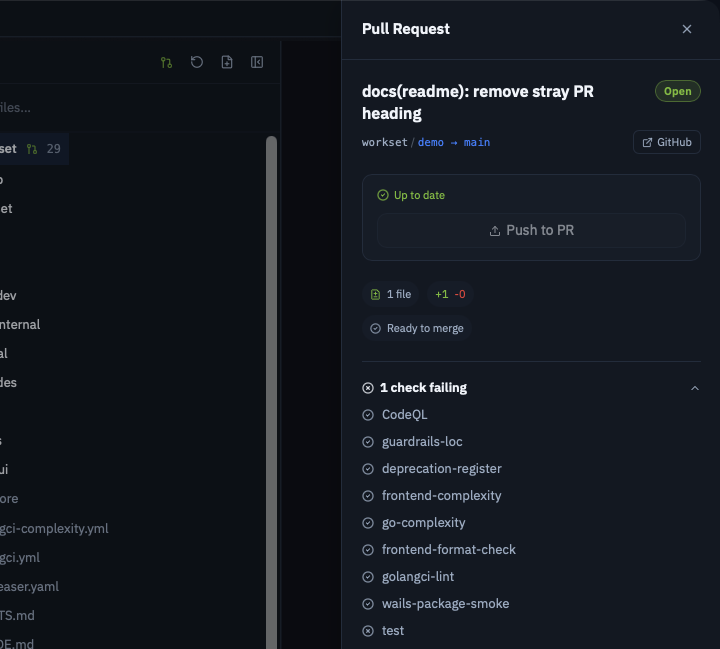
Section titled “Viewing PR Status”The desktop app shows:
- PR creation status
- CI check results
- Review comments
- Merge status
Troubleshooting
Section titled “Troubleshooting”ghnot found: Setgithub.cli_pathin your config.- Auth errors: Run
gh auth statusto verify your session. - PAT issues: Ensure the token has
reposcope.