
AI Agents
Workset uses external CLI tools to generate PR descriptions and commit messages. It shells out to the configured agent, passes a prompt with your diff context, and parses structured output back.
Supported Agents
Section titled “Supported Agents”| Agent | CLI Tool | Provider |
|---|---|---|
codex | Codex CLI | OpenAI |
claude | Claude Code | Anthropic |
Both agents must be installed separately and available on your PATH.
Configuration
Section titled “Configuration”Set the default agent in your global config (~/.workset/config.yaml):
defaults: agent: codexModel Override
Section titled “Model Override”Optionally specify a model for text generation:
defaults: agent: codex agent_model: o3For Codex this passes -m <model>, for Claude it passes --model <model>.
Agent CLI Path
Section titled “Agent CLI Path”If the agent binary isn’t on your PATH, set it explicitly:
agent: cli_path: /usr/local/bin/codexAuthentication
Section titled “Authentication”Each agent handles its own authentication — Workset does not manage API keys.
- Codex: Requires an OpenAI API key. Run
codex author setOPENAI_API_KEYin your environment. - Claude: Requires an Anthropic API key or active session. Run
claudeto authenticate or setANTHROPIC_API_KEY.
How It Works
Section titled “How It Works”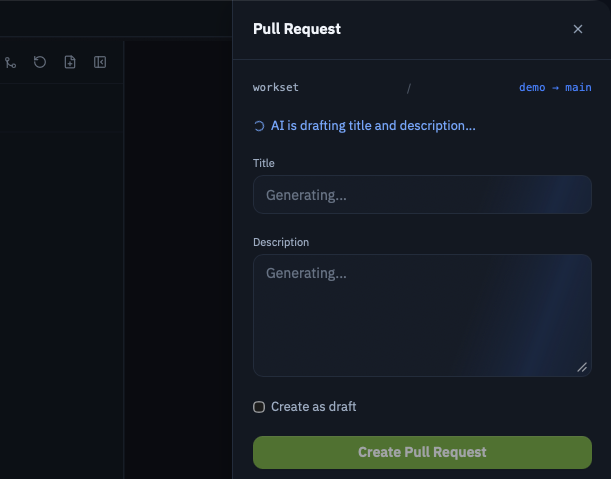
When you generate a PR description or commit message, Workset:
- Builds a prompt from your diff, branch name, and commit history
- Invokes the configured agent CLI (e.g.,
codex exec -) - Passes a JSON schema for structured output
- Parses the agent’s response into a title and body (for PRs) or a commit message
The agent runs in the repo’s worktree directory, so it has full context of the codebase.
Desktop App
Section titled “Desktop App”In the desktop app, the configured agent is used for:
- Generating PR descriptions from the PR creation flow
- Creating commit messages
- Default coding agent for embedded terminals (configurable per terminal)
CLI Usage
Section titled “CLI Usage”The CLI uses the configured agent when running commands that support AI generation. The agent setting in defaults.agent applies globally.
Next Steps
Section titled “Next Steps”- GitHub Integration for PR workflows
- Config Reference for all agent configuration options